What Is a Variable in Programming? A Simple Guide for Beginners
- December 15, 2025
- 8 min read
- Programming concepts
Table of Contents
How does a video game remember your score?
How does a social media app greet you by name?
The answer is one of the most fundamental building blocks in all of programming: variables.
If you’re new to coding, understanding variables is the first major step. This guide will break it down in simple terms.
The Core Idea: A Labeled Box
The easiest way to think of a variable is as a labeled box that holds a piece of information.
- It has a name (the label): This is how you find the box again. You might have a box labeled
playerNameorscore. - It holds a value (the contents): This is the information stored inside. The
playerNamebox might hold the text “Alex”, and thescorebox might hold the number100.
You, the programmer, get to choose the name and what to put inside. You can look at what’s inside the box or change its contents anytime.
Let’s see this in action with a tiny bit of Python code:
1# Create a variable 'score' and put the number 0 in it.
2score = 0
3print("The current score is:", score)
4
5# Change the value inside the 'score' box.
6score = 100
7print("The new score is:", score)
In this example, score is the label on our box. We first put 0 in it, then later updated it to hold 100.
How Variables Work: A Salad Recipe
Now, let’s use a more detailed analogy to see how variables work together in a program.
Think of a program as a recipe and variables as the containers of ingredients on your countertop.
The Workspace (Initial Variables)
Imagine you have the following items ready for your recipe:
| Variable Name (Container) | Initial Value (Contents) |
|---|---|
carrot_container | Whole carrots |
lettuce_container | Whole lettuce |
olive_oil_bottle | Extra virgin olive oil |
cutting_board | Empty |
mixing_bowl | Empty |
These are our starting variables and their initial values.
The Recipe (Program Instructions)
Now, let’s follow the recipe, which updates our variables step-by-step:
- Place the value from
lettuce_containeronto thecutting_board.cutting_boardnow holds Whole lettuce.
- Chop the lettuce on the
cutting_board.- The value of
cutting_boardis changed to Chopped lettuce.
- The value of
- Put the value from
cutting_boardinto themixing_bowl.mixing_bowlnow holds Chopped lettuce.cutting_boardis empty again.
- Place the value from
carrot_containeronto thecutting_board.cutting_boardnow holds Whole carrots.
- Slice the carrots on the
cutting_board.- The value of
cutting_boardis changed to Sliced carrots.
- The value of
- Add the value from
cutting_boardto themixing_bowl.mixing_bowlnow holds Chopped lettuce and Sliced carrots.
- Pour some value from
olive_oil_bottleinto themixing_bowl. - Toss the contents of the
mixing_bowl.- The value of
mixing_bowlis replaced with Tossed salad.
- The value of
Tip
Moving vs. Copying
Notice how in our recipe, when we put the lettuce from the cutting_board into the mixing_bowl, the cutting_board became empty again. In programming, this is often the most efficient way to transfer a large item.
However, in many languages (especially when dealing with simple numbers or text), the program makes a complete copy of the value instead, leaving the original container untouched.
This recipe shows how a program uses variables to hold and transform data to reach a final goal.
Newsletter
Subscribe to our newsletter and stay updated.
Fundamental Rules of Variables
The analogy is great, but in real programming, there are a few important rules.
1. Variables Have Data Types
A box isn’t just a box; it has a shape. You can’t fit a basketball into a shoebox. Similarly, variables are designed to hold specific types of data.
Common data types include:
- Integer: For whole numbers (
100,-5,0). - String: For text (
"Alex","Hello, World!"). - Boolean: For true or false values (
true,false).
Using the correct type prevents errors, like trying to do math on a variable that holds text.
In some languages, like Python, the computer figures out the type automatically (dynamic typing). In others, like Java, you must explicitly specify the type when you create the variable (static typing).
2. Variable Naming: The Universal Rules and Key Exceptions
You can’t name your variable just anything. While most languages share similar rules, you must be aware of major differences.
The Core Universal Rules
In the majority of languages (like Python, Java, JavaScript, C++):
- Characters: Names are built from letters, numbers, and the underscore (
_). Spaces are not allowed. - Start Character: Names must begin with a letter or an underscore—never a number.
- Reserved Words: You cannot use reserved keywords (like
iforfor).
These are the rules of what’s possible. To learn the conventions—like when to use player_score (snake_case) versus playerScore (camelCase)—read our guide on How to Format Names in Your Code
Crucial Exceptions to Know
| Rule | Typical (Python, C++) | Exception (e.g., Fortran, Perl) | Why? |
|---|---|---|---|
| Case Sensitivity | Case-Sensitive (score != Score) | Case-Insensitive (e.g., Ada, Pascal) | Historically common in certain domains (like databases). |
| Mandatory Prefix | No Mandatory Sigil | Mandatory Sigil ($age, @list in Perl/Ruby) | Sigils explicitly denote the variable’s type. |
The Golden Rule: For large pieces of code, descriptive names are usually best: player_score is much better than ps.
However, sometimes shorter names are clearer, as we show in our guide on Why Descriptive Variable Names Are Not Always Good.
3. Some Variables Don’t Change (Constants)
Sometimes, you have a value that should never change, like the value of Pi (3.14159). For this, programmers use constants.
A constant is like a labeled box made of tamper-proof glass. You can see and read the value inside anytime, but you cannot change or replace the contents once they are set.
It’s a variable whose value is meant to be permanent throughout the program’s execution.
1// C enforces that this value cannot be changed after definition
2const int MAX_PLAYERS = 4;
In some languages (like Python), constants are a convention rather than a strict rule (not enforced by the language).
By convention, you name them in all uppercase letters (e.g., MAX_PLAYERS) to signal that they should not be changed.
How It Really Works: Memory Allocation
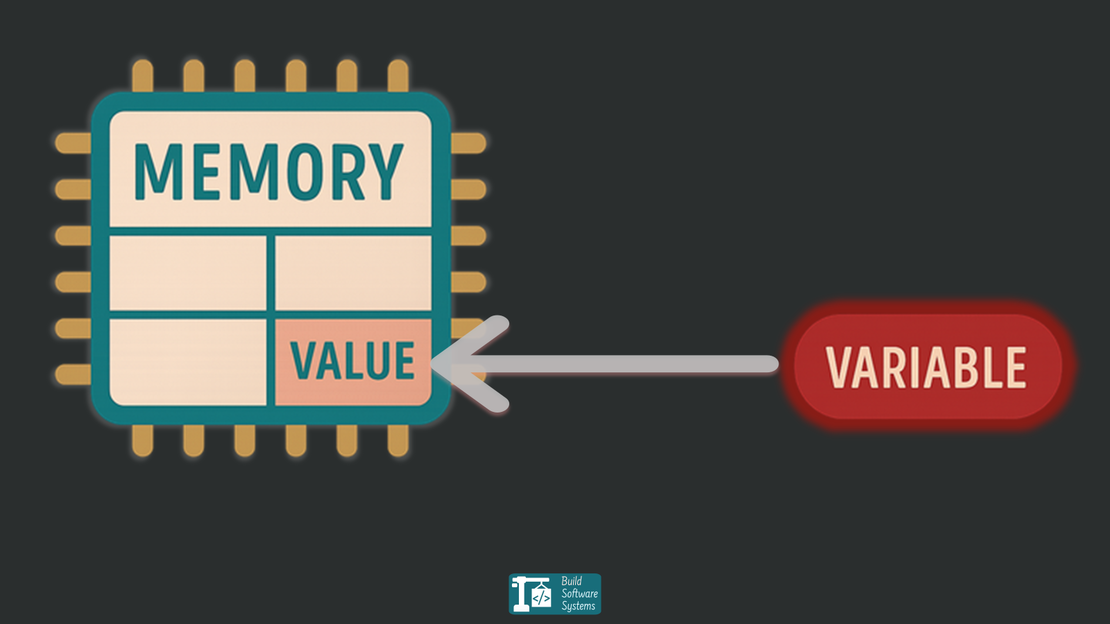
So where are these “boxes” actually stored? When your program runs, the computer allocates a small chunk of its Random Access Memory (RAM) for each variable.
The size of this chunk depends entirely on the variable’s data type (a number needs less space than a long piece of text).
The variable’s name (score) is a human-friendly pointer to a specific memory address (e.g., 0x1A7F).
When you write score = 100, the computer finds the memory location for score and writes 100 there.
When you write print(score), the computer goes to that same memory address, reads the value, and displays it.
This process ensures that for simple values like numbers, if you reassign one variable, you don’t accidentally affect others. They each point to their own distinct, dedicated location in memory.
Warning
In some languages, or when dealing with complex structures (like Lists or Objects), two variables can be set up to point to the same data block in memory.
If you change the contents of that data block through one variable, the change will be seen by the other!
Key Takeaways
- A variable is a named container for a piece of data.
- Variables allow programs to store and manipulate information by reading and writing values in memory.
- Variables have data types that determine what kind of information they can hold and the size of memory they require.
- Constants are variables whose values should not change.
- The salad recipe is a great way to visualize how a program uses many variables to process data step-by-step.
And that’s it! You now understand the single most important concept in programming. Every complex application you’ve ever used is built on this simple idea of storing information in variables.
Newsletter
Subscribe to our newsletter and stay updated.