The Tricky Python Bug I Created by Misunderstanding bool()
- May 25, 2026
- 4 min read
- Python programming
I once introduced a subtle bug into a Python program because of a simple assumption.
I had a variable is_enabled that was supposed to be a string representing a boolean value: either "true" or "false".
To evaluate it, I wrote this condition:
1if bool(is_enabled.capitalize()):
2    # Do something when True
At first glance, it looks reasonable.
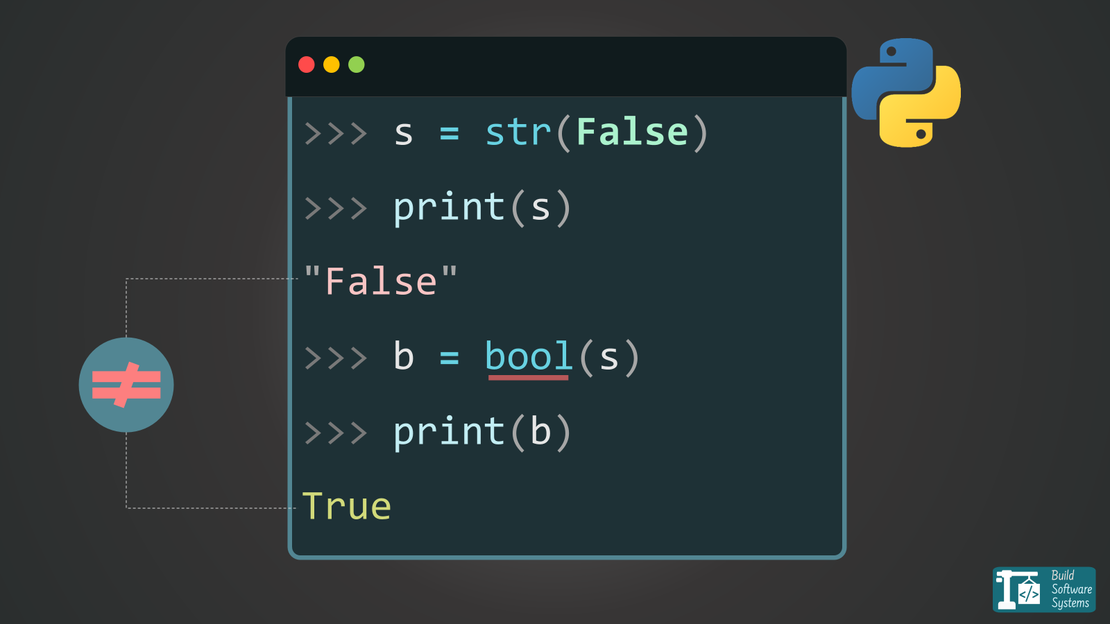
If is_enabled is "false", then is_enabled.capitalize() becomes "False", and bool("False") should evaluate to False, right?
Wrong. The condition evaluated to True every single time, completely breaking the logic of my program.
The Symmetric Intuition Trap
The main reason I made this mistake comes down to a false sense of symmetry in Python’s type casting. Python makes it incredibly easy to move between types, and most conversions feel bidirectional:
- with integers
str(1)gives you"1"int("1")gives you1
- With floats
str(1.5)gives you"1.5"float("1.5")gives you1.5
- With booleans
str(True)gives you"True"andstr(False)gives you"False"
Naturally, your brain builds a mental model that passing the string representation of a value back into its type constructor will reverse the process.
You expect bool("True") to be True and bool("False") to be False.
But this symmetry breaks entirely when turning a string into a boolean.
Why Python Evaluates "False" as True
In Python, the bool() constructor does not parse the textual content of a string (unlike int() or float()).
Instead, it evaluates the string based on Python’s core rules of Truth Value Testing (or “truthiness”).
According to the official Python Documentation, an object is considered true unless its class defines a __bool__() method that returns False or a __len__() method that returns 0.
For strings, this means:
- The empty string
""isFalse(because its length is 0). - Any non-empty string is
True(regardless of what characters it contains).
Because of this rule, all of these statements evaluate to True:
1print(bool("true"))   # True
2print(bool("False"))  # True
3print(bool("0"))      # True
4print(bool(" "))      # True (contains a space)
My code bool(is_enabled.capitalize()) was taking "false", turning it into "False", and since "False" is a non-empty string, Python correctly—by its own rules—evaluated it as True.
How to Correctly Parse Boolean Strings
If you actually need to convert a string variable containing "true" or "false" into a proper boolean, you cannot rely on bool(). Instead, use one of these explicit approaches:
1. Direct String Comparison (Recommended)
The cleanest and most human-readable way is to compare the lowered string directly to "true".
1# Evaluates to True only if is_enabled is any case form of "true"
2is_valid = is_enabled.lower() == "true"
2. Using a Mapping Dictionary
If you want to explicitly handle both valid states and catch unexpected inputs, a dictionary works perfectly.
1STR_TO_BOOL = {"true": True, "false": False}
2
3# Returns True, False, or None if the string matches neither
4is_valid = STR_TO_BOOL.get(is_enabled.lower())
Tip
Lessons learned
- Never use
bool(string)to parse text-based boolean values like"False". - Remember that every non-empty string is truthy in Python.
- Python prioritizes explicit collection length over string content when casting to booleans.
Hope this saves you from falling into the same truthiness trap next time you handle string-to-boolean conversions in Python!
Newsletter
Subscribe to our newsletter and stay updated.