Microservices Data Evolution: Avoiding Breaking Changes with Compatibility
- December 1, 2025
- 6 min read
- Programming concepts , Software quality
Table of Contents
Splitting a monolith into microservices gives you huge gains in agility, but it introduces a major headache: data incompatibility.
When separate processes need to talk to each other, you face a crucial design decision: how will they communicate without constantly breaking things?
This decision isn’t just about speed. It starts with the basics of any communication channel:
- Communication protocol (e.g., HTTP for requests, AMQP for messages)
- Data serialization mechanism (how you encode the data to send and decode it when you receive it)
- Supporting frameworks/libraries (like gRPC, Kafka, or plain REST)
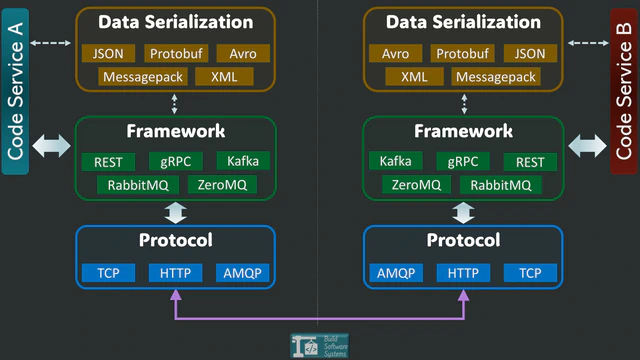
The Crucial Role of Serialization
You have plenty of data formats to choose from (JSON, Protobuf, Avro, etc.). They all come with trade-offs across five key characteristics:
- Speed: How fast the data is encoded and decoded.
- Size: How compact the data is over the wire.
- Readability: Can a human easily read it for debugging?
- Support: Is it well-supported across all the programming languages you use?
- Evolvability: Can the data structure change without crashing your system?
The first four factors handle performance and logistics. But evolvability is the essential characteristic that allows your system to survive inevitable updates.
If your format lacks evolvability, the rest don’t matter—you’ll risk constant failures.
The Reality of Change: Why Deployments Break Things
Evolvability is simply the ability to modify your exchanged data structure without causing a system failure.
You might assume you can update every service at the same time. In a perfect world, that would work. In reality, it rarely does because:
- Deployments are always gradual. It takes time to roll out updates across all environments and machines.
- Rollbacks are necessary. If a bug appears, one service might revert to an older version while others stay current.
- Clients lag behind. External partner systems or user-facing apps may take days or weeks to adopt your new data structure.
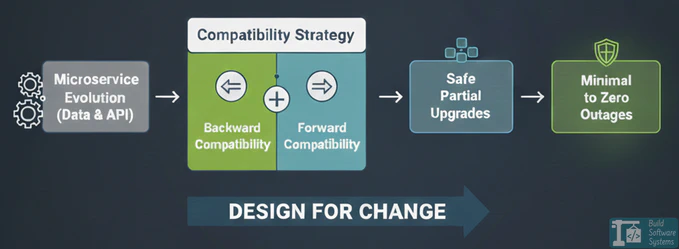
This means you must design your system to handle partial upgrades. Some services will be using the new data structure, and others will still be using the old one.
The Two Golden Rules: Backward and Forward Compatibility
To handle these partial upgrades safely, your system needs two things:
- Backward Compatibility: A newer service must be able to successfully process data that was produced by an older service.
- Forward Compatibility: An older service must be able to successfully process (or at least tolerate) data produced by a newer service.
Without these two rules, even a simple, unsynchronized deployment can lead to data loss or cascading failures.
| CONSUMER (OLD V1) | CONSUMER (NEW V2) | |
| PRODUCER (OLD V1) | Works (Base Case) | Backward Compatibility (Must handle old data) |
| PRODUCER (NEW V2) | Forward Compatibility (Must tolerate new data) | Works (New Case) |
Strategy 1: Compatible Schema Evolution
This strategy works best when all your services share a common schema—a formal blueprint of the data. Tools like Protobuf (Protocol Buffers), Avro, or Thrift enforce rules to ensure changes remain compatible.
Info
While readable, JSON is weakly typed and relies on manual handling of unknown fields.
This makes compatible evolution challenging, which is why strongly-schemed formats like Protobuf and Avro are preferred for internal service-to-service communication
How it works:
Instead of releasing a new API, you evolve the existing data structure:
- Unknown fields: The serialization library makes sure all consuming services safely ignore any fields they don’t recognize. This supports forward and backward compatibility.
- Adding a field: You make the new field optional. The library will ignore this field (treat as unknown) when older services receive it. This ensures the application code won’t see the new data.
Critically, the new service must also be prepared to handle this field being missing in old payloads. - Removing a field: Newer services can stop sending the field. Older services must handle the missing data by using the field’s default value or a fallback.
This ability to handle missing data is also essential for new services reading old payloads (backward compatibility).
Warning
Any editing of an existing field’s core attributes (other than deprecation) is highly dangerous. To maintain Backward Compatibility, you must never change an existing field’s:
- Data Type (e.g.,
integertostring). - Semantics/Meaning (e.g., reusing field 1 for a completely new purpose).
- Code Dependency (i.e., making a field required by new logic that old services don’t provide).
These changes instantly break your deployment process.
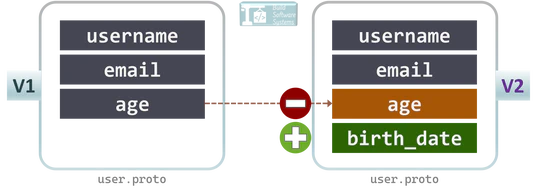
Example (Protobuf):
 1// v1
 2message User {
 3  string username = 1;
 4  string email = 2;
 5  int32 age = 3;
 6}
 7
 8// v2 (Safe Evolution)
 9message User {
10  string username = 1;
11  string email = 2;
12  int32 age = 3 [deprecated = true]; // Older services can still read 'age'
13  string birth_date = 4; // Newer services use 'birth_date'
14}
| Advantages | Disadvantages |
|---|---|
| Single data structure to maintain. | Functional changes are limited (mostly just adding/deprecating fields). |
| Compatibility is handled automatically by the library. | Schemas can accumulate many deprecated fields over time. |
Strategy 2: Multiple API Versioning
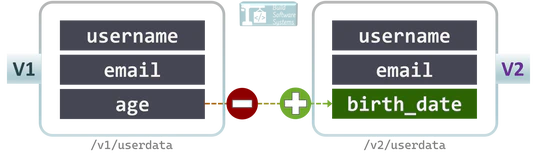
When a change is massive, or you need to completely reorganize your data in a non-compatible way, you release a new API version and run the old and new versions side-by-side.
How it works:
- Keep the old endpoints active (e.g.,
/v1/userdata). - Introduce new endpoints (e.g.,
/v2/userdata) with the completely updated data and logic. - Allow a migration window for clients to switch over.
- Deprecate and remove the old version once everyone has moved.
Info
Versioning can be done via the URL path (e.g., /v2/userdata) or using a custom request header (Accept or X-API-Version).
| Version | API Endpoint | Change |
|---|---|---|
| v1 | /v1/userdata | initial details |
| v2 | /v2/userdata | change a field to another |
| Advantages | Disadvantages |
|---|---|
| Maximum flexibility—you can change anything. | You have to maintain multiple APIs simultaneously. |
| Older clients remain completely unaffected. | Higher testing, deployment, and maintenance workload. |
Choosing the Right Approach
| Factor | Schema Evolution | API Versioning |
|---|---|---|
| Maintenance effort | Lower | Higher (multiple APIs) |
| Flexibility | Limited to compatible changes | Unlimited structural changes |
| Best for | Internal microservices that talk to each other | Public-facing APIs with external clients |
- If most of your changes are additive (you’re just adding a new feature or field), choose Schema Evolution (Protobuf/Avro) for internal communication. It’s the least effort.
- If you have external clients or need a major structural overhaul, choose API Versioning.
- Many large teams use a smart combination: schema evolution for everything inside the company firewall, and API versioning for public endpoints.
Newsletter
Subscribe to our newsletter and stay updated.
Key Takeaway
Data structure evolution is guaranteed in any living microservice system.
By designing for backward and forward compatibility from the very start, you empower your teams to roll out features safely, handle those messy partial upgrades, and achieve change without chaos.