The Silicon Limit: Why Floating-Point and Integer Math Fails Silently
- April 16, 2026
- 8 min read
- Programming concepts , Software quality
Table of Contents
I recently built an execution metric interface to track application performance data.
I chose float for the metric value type because it seemed sufficient for decimal numbers.
When we checked the data, the numbers were wrong. They didn’t match our expected results. We assumed the math logic was broken and spent hours debugging the computation code.
The results were also inconsistent. Sometimes the values were perfect. Other times, they showed a systematic drift from the truth.
We eventually found the culprit: the limited precision of the float type.
It lacked sufficient precision for our range of values.
The fix was simple: we switched to double, and the errors vanished.
Choosing the wrong data type is a silent killer in software. It doesn’t always crash your program. Instead, it slowly corrupts your data.
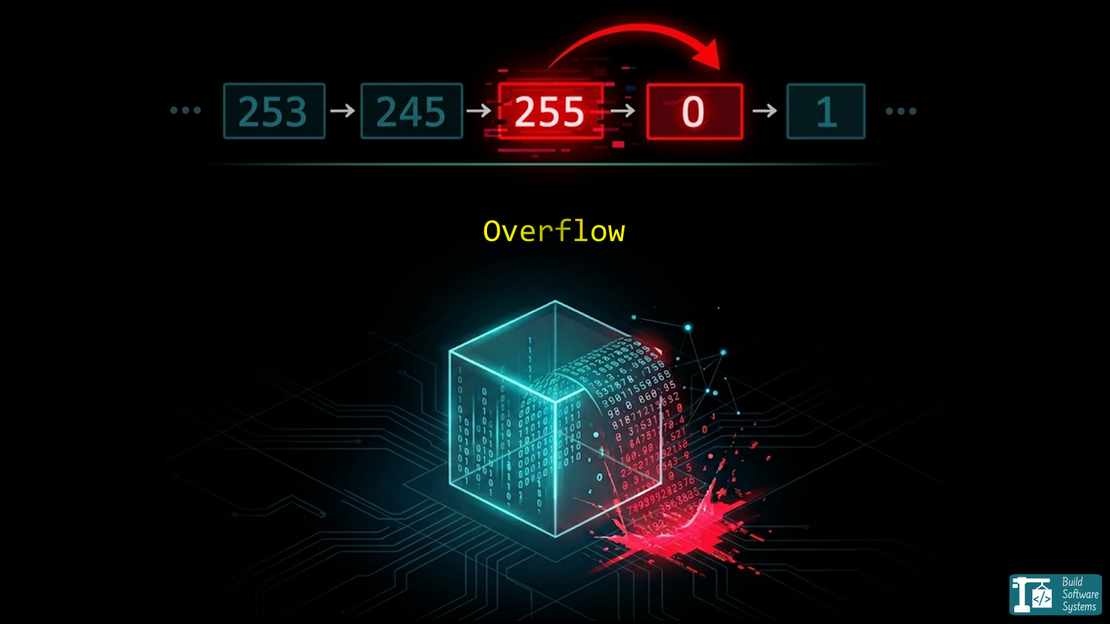
These issues often appear as floating-point precision errors or integer overflow, both of which can silently corrupt calculations.
Why Small Choices Matter: Ariane and Boeing
This isn’t just a “small bug” issue. History shows that numerical errors can be catastrophic.
- The Ariane 5 Rocket (1996): A 64-bit floating-point number was converted into a 16-bit signed integer. The value was too large. It caused an overflow. The rocket self-destructed 37 seconds after launch. Read the full report here.
- The Boeing 787 Power Bug: A software counter used a 32-bit signed integer to track time in centiseconds. If the plane stayed powered for 248 days, the counter overflowed. This could shut down all electrical power mid-flight. See the FAA directive.
Case 1: Integers and the Hard Ceiling
Integers are stored in a fixed number of bits. A C language signed int typically uses 32 bits. It has a hard maximum and minimum.
How they are represented: Integers use a direct binary format (often Two’s Complement for signed values). There are no fractions.
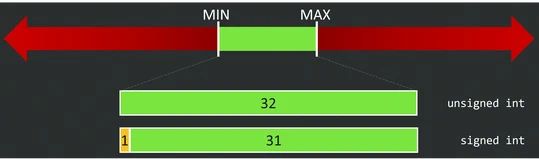
The Overflow/Underflow: When an integer hits its limit, it “wraps around”.
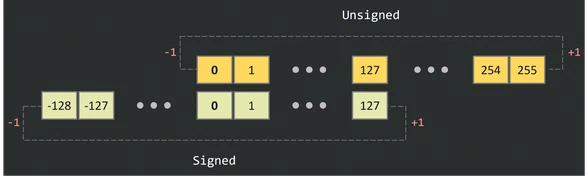
Example:
1#include <stdio.h>
2
3int main() {
4    unsigned char max_val = 255;
5    printf("Max: %hhu\n", max_val);
6    printf("Overflow: %hhu\n", max_val + 1); // Becomes 0
7    return 0;
8}
The output is:
Max: 255
Overflow: 0
We’re using an 8-bit unsigned integer (unsigned char in C), your max value is 255 (2^8 - 1).
- The Math:
255 + 1
But wait—the register only holds 8 bits.
That leading 1 has nowhere to go. It “carries out” into a special CPU flag, and the register is left with 00000000.
A similar behavior happens when you subtract, which is called underflow.
For example, if you subtract 1 from 0, it wraps around to 255 in an unsigned 8-bit integer.
Why Signed Integers are Scarier
With Signed Integers, the leftmost bit is the “Sign Bit” (0 for positive, 1 for negative). If you overflow a positive number, you accidentally flip that bit. Suddenly, your huge positive bank balance becomes a massive negative debt.
1#include <stdio.h>
2
3int main() {
4    signed char max_val = 127;
5    printf("Max: %hhd\n", max_val);
6    printf("Overflow: %hhd\n", max_val + 2); // Becomes -127
7    return 0;
8}
The output is:
Max: 127
Overflow: -127
- The Math:
127 + 2
in Two’s Complement is -127.
Warning
The “Wrap-Around” Myth
Don’t assume wrapping is guaranteed. While standard desktop hardware often wraps numbers using Two’s Complement, the rules change depending on your system and language:
- C/C++ Compiler Traps: In C, signed integer overflow is Undefined Behavior. Because the language spec says it shouldn’t happen, modern compilers (like GCC or Clang) might optimize out your safety bounds checks entirely.
- Saturating Hardware: Many graphics chips and Digital Signal Processors (DSPs) use saturating arithmetic instead of wrapping—meaning the number simply glues itself to the maximum value (
127 + 2stays127) rather than flipping to a negative number. - Language Safety: Modern languages handle this defensively; Rust will crash (
panic) on overflow during debug builds, whereas Python avoids it by automatically expanding integer sizes in memory.
For a deeper breakdown of why wrap-around is not a safe default and how overflow behavior differs across languages and systems, see: Integer Arithmetic Is Not Safe by Default: The Overflow Contract You Didn’t Define.
Case 2: Floats and the Moving Target
Floating-point numbers are more complex.
How they are represented: A float is split into three parts:
- Sign bit: Positive or negative.
- Exponent: Determines the range (the “scale”).
- Mantissa (Significand): Determines the precision (the “digits”).
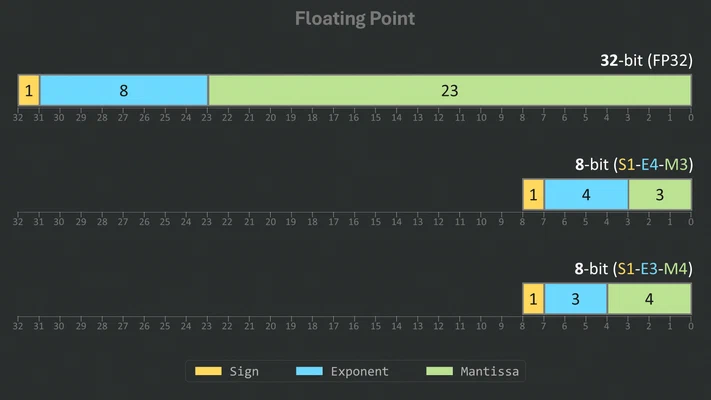
They typically follow the IEEE 754 standard. Several smaller formats exist, like Minifloats, which are used in machine learning and computer graphics for efficiency.
The Two Types of Float Warnings:
- Infinite Overflow: The number becomes too large for the exponent. It turns into
inf(infinity). - Precision Loss: The number is within range, but the mantissa is too small to track changes. This is what happened in my metric interface.
 1#include <stdio.h>
 2#include <float.h>
 3
 4int main() {
 5    // 1. Exponent Overflow
 6    float big = FLT_MAX;
 7    printf("Max Float: %e\n", big);
 8    printf("Overflow to Inf: %e\n", big * 2.0f);
 9
10    // 2. Precision "Overflow" (The silent error)
11    float x = 16777216.0f; // 2^24
12    printf("Original: %f\n", x);
13    printf("Add 1.0:  %f\n", x + 1.0f); // Still prints 16777216.000000
14
15    printf("Max Float and precision: %e\n", big + 1000.0f);
16
17    return 0;
18}
The output is:
Max Float: 3.402823e+38
Overflow to Inf: inf
Original: 16777216.000000
Add 1.0:  16777216.000000
Max Float and precision: 3.402823e+38
In the second case, the value is so large that adding 1.0 is “lost” because the mantissa can’t represent that level of detail.
The gap between representable numbers grows exponentially as the exponent increases.
Interestingly, precision loss and infinite overflow are not mutually exclusive.
Adding a small number to FLT_MAX typically results in precision loss; the value may remain FLT_MAX unless the addition is large enough to trigger an overflow to infinity.
Distribution of Representable Numbers
To illustrate this, let’s visualize how these numbers are distributed for an 8-bit float.
Let’s look at 8-bit floats S1E4M3 (4 bits for exponent, 3 bits for mantissa) and S1E3M4 (3 bits for exponent, 4 bits for mantissa).
| Feature | Float S1E4M3 | Float S1E3M4 |
|---|---|---|
| Exponent Bits | 4 | 3 |
| Mantissa Bits | 3 | 4 |
| Distinct Numbers | 239 | 223 |
| Min Value | -240.0 | -15.5 |
| Max value | 240.0 | 15.5 |
| Core Strength | Wider Dynamic Range | Higher Precision |
Excluding -inf, inf, and NaN, S1E4M3 can represent 239 distinct numbers between -240.0 and 240.0 while S1E3M4 can represent 223 distinct numbers between -15.5 and 15.5.
However, S1E3M4 has more precision for small numbers due to its larger mantissa, while S1E4M3 can represent a wider range of values but with less precision for small numbers.
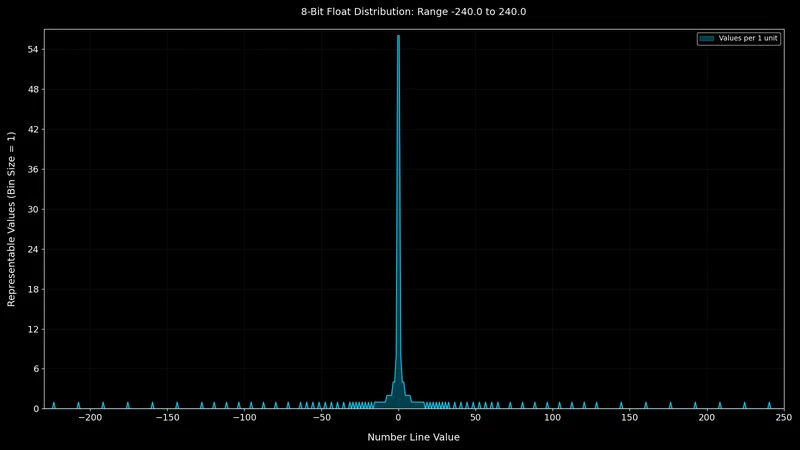
Let’s visualize the distribution of representable numbers for an 8-bit float with 4 exponent bits and 3 mantissa bits (S1E4M3).
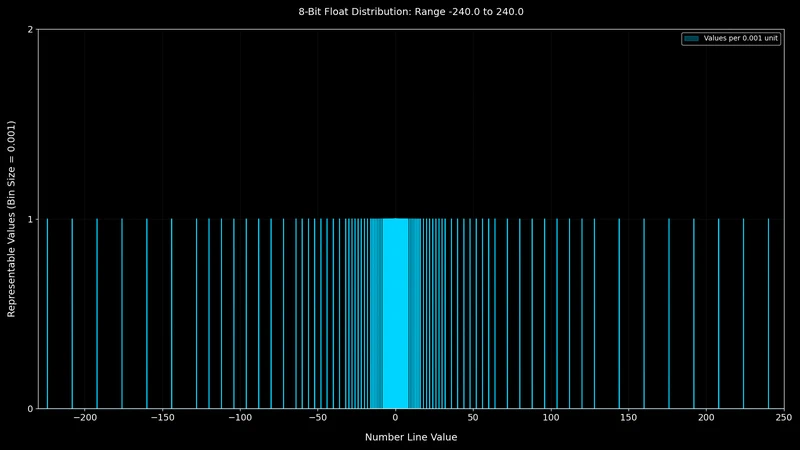
No values exist in the gaps between the spikes. As we move away from zero, the representable numbers become more sparse.
From the value 16.0 onward, we can no longer represent every whole integer because the spacing between representable values becomes greater than 1.
This threshold comes from:
For example, we cannot represent 17.0.
That is exactly the issue I had with my metric interface.
Dealing with “Nothing”
Floats have a special state called NaN (Not a Number). This occurs during undefined operations, like or the square root of a negative number. You can read more about NaN on Wikipedia.
Integers handle undefined operations differently than floats.
They do not have a “Not a Number” (NaN) state.
If you perform an invalid operation like dividing by zero, the behavior is undefined and may crash the program.
They must always represent a valid bit-pattern within their range.
Newsletter
Subscribe to our newsletter and stay updated.
Conclusion
You need to understand your numeric type requirements: the set or range of values you will need to represent as well as the acceptable precision loss.
- Use integers when you need exact counts and can predict the maximum range.
- Use double (64-bit) as your default for decimals. Only use float (32-bit) or Minifloats if you have extreme memory constraints and have verified that the precision loss won’t break your logic.
- When doing arithmetic operations, always test with edge cases, especially around the limits of your data types.
If you use floating-point numbers, pay attention to the exponential decrease of precision as the value grows.
You can read more about the distribution of floating-point numbers and their precision in Fabien Sanglard’s visual explanation.