From Bare Metal to Containers: A Developer’s Guide to Execution Environments
- January 5, 2026
- 13 min read
- Software platform
Table of Contents
Ever had that dreaded “but it works on my machine!” moment?
The culprit is often a subtle difference in the execution environment—the “stage” where your code performs. You might be dealing with a binary linked against the wrong glibc, a Python wheel built for a different architecture, or a kernel feature quietly missing in production. These invisible discrepancies are what turn a successful local build into a deployment disaster.
Getting the environment right is crucial for writing, testing, and shipping software reliably. But the landscape is crowded with terms like virtual machines (VM), containers, virtual environments, and more. What’s the difference, and which one should you use?
We’re going to trace the evolution of the execution environment. We’ll start with raw hardware and work through VMs, containers, and the various ways we isolate code at the operating system (OS) and language level. Along the way, we’ll break down the trade-offs for each approach. By the end, you’ll know exactly which tool to grab for your next project.
The Journey Toward Lightweight Isolation
The history of computing is largely a history of resource sharing without chaos.
Early systems ran one workload per machine. Today, a single server might host thousands of isolated applications owned by different teams. The unifying idea behind this evolution is isolation: separating code, dependencies, and resources so they don’t interfere with one another.
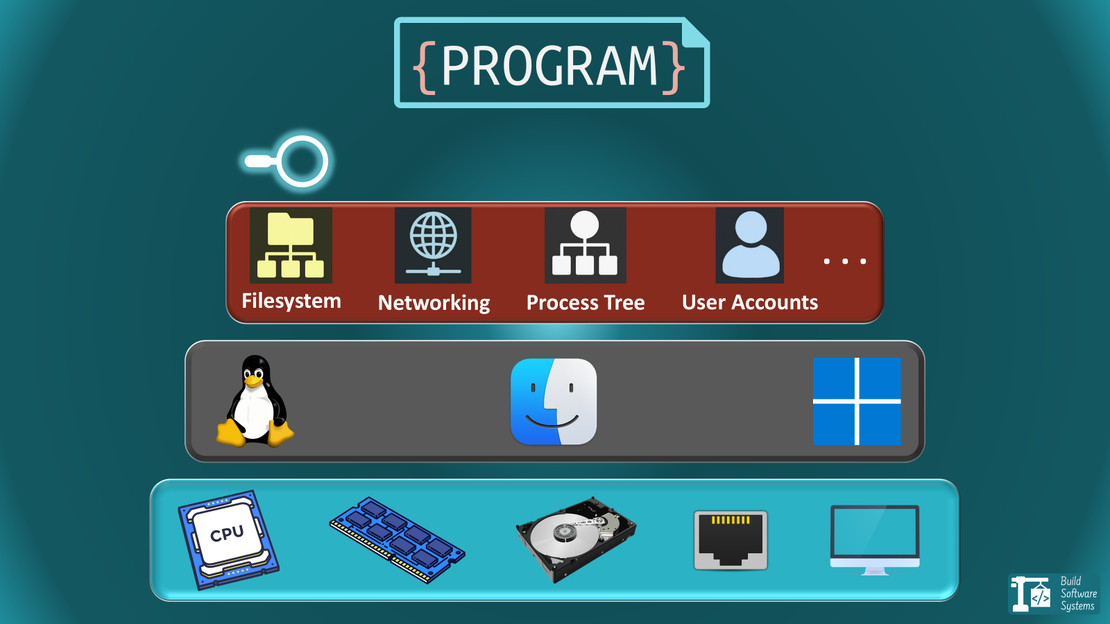
But isolation is not binary. It exists on a spectrum—hardware, kernel, process, filesystem, language runtime. Each execution paradigm chooses a different point on that spectrum.
Rule of thumb: any layer below your chosen isolation boundary must already be compatible—containers won’t fix a kernel mismatch, and virtual environments won’t fix a missing system library.
We’ll move from the heaviest to the lightest abstractions.
1. Physical Machine (Bare Metal)
This is the foundation. One machine, one operating system, running your code directly on the hardware.
Hardware (CPU, memory, Disk,…): Uniquely provided by a physical machine. Two separate environments imply two separate physical machines, each with its own dedicated hardware resources like CPU, memory, and disk.
Think of it as a detached house. You have all the resources to yourself, with no neighbors to bother you.
- Pros: Maximum performance, full control over hardware.
- Cons: Expensive (you pay for idle resources), slow to provision, inflexible.
- Use Case: High-performance computing (HPC), large databases, or legacy systems that require direct hardware access.
2. Virtual Machine (VM)
VMs were the first major leap in efficiency. A piece of software called a hypervisor carves up a single physical machine into multiple, independent virtual ones.
Operating System: Uniquely provided by virtual machines. Two environments can run on the same hardware but will have their own separate, full-fledged operating systems.
This is like an apartment building. You still have your own private space (kitchen, bathroom, Operating System), but you share the building’s underlying infrastructure (hardware).
- Pros: Strong isolation, can run different operating systems on one host (e.g., Windows and Linux).
- Cons: Significant overhead (each VM has a full OS), slower to start than containers.
- Common Tools:
- VirtualBox: Great for desktop virtualization.
- Hyper-V: Microsoft’s native hypervisor for Windows.
- KVM: The go-to hypervisor for Linux.
- QEMU: A powerful machine emulator and virtualizer.
- LXD: While primarily a container manager, recent versions can also manage full virtual machines, offering a unified tool for both.
3. Container
Containers revolutionized modern software development. They bundle an application and its dependencies, but—here’s the key difference—they share the host machine’s operating system kernel.
Application and Dependencies: Characterized by packaging an application along with all its dependencies. Multiple containerized environments share the host OS kernel but run in isolated user spaces.
Think of containers as hotel rooms. Each is a self-contained, identical unit, but they all rely on the hotel’s core services (the host OS kernel). This makes them incredibly lightweight and fast.
Under the hood, this isolation is enforced by Linux namespaces (which give each container its own view of processes, networking, and the filesystem) and cgroups (which strictly control how much CPU, memory, and I/O it can consume).
- Pros: Extremely fast startup, low overhead, highly portable, perfect for microservices.
- Cons: Weaker isolation than VMs (shared kernel can be a security concern).
- Common Tools:
Note
LXD’s Dual Nature:
LXD is a unique tool that intentionally blurs the lines. Its primary strength is managing LXC system containers, which feel like ultra-fast VMs but are technically containers.
However, as we’ve listed, LXD can also manage full virtual machines. This makes it a powerful, unified tool for developers who want a single interface for both environment types.
What About Managing Many Containers? Orchestration
Tools like Docker and LXD are great for running containers on a single machine. Docker Compose builds on this by managing multi-container applications as a single unit. It allows you to define services like a web server and a database together, though it still operates on a single host.
When you need to manage applications across many machines, you move to container orchestrators like Kubernetes, Docker Swarm, or Nomad. Orchestration is not isolation. They are the next layer of management for handling scheduling, scaling, and networking at scale. They do not solve environment drift, dependency mismatches, or build reproducibility.
While orchestration is a deep topic for its own article, it’s the logical next step after adopting containers.
4. Process Sandbox
This is a more specialized form of isolation, often used for security. It “jails” a process, restricting its view of system resources.
Interface-Level Isolation: Defined by filtering a process’s interaction with the Linux Kernel.
Instead of providing a new environment, we strip away the process’s “powers” and limit its authority and vocabulary.
It provides a sandboxed execution space for a single process or a group of related processes.
This is like putting a specific activity into a “Safety Cabinet”. You aren’t building a new room; you are simply limiting what the process is allowed to do within your existing system through thick glass and heavy gloves.
- Pros: Very lightweight, OS-native security feature.
- Cons: Can be complex to configure correctly, less feature-rich than full container runtimes.
Sandboxes shine when you want to reduce the blast radius of a single process—not when you need a reproducible environment. They are about limiting damage, not standardizing execution.
To build a proper sandbox, we control three specific dimensions:
- Where (Filesystem): Limiting the reach to specific folders.
- What (Privileges): Limiting the authority to specific actions.
- How (System Calls): Limiting the communication with the OS kernel.
The Sandboxing Toolbox & Mechanisms
You can combine the following mechanisms (to create a robust sandbox), or use them individually:
Filesystem Jails (Where): Restricts the process to a specific directory tree.
- chroot A classic UNIX utility that changes the (perceived) top-level root directory of a process. E.g.: make the process see
/tmp/jailas/. - proot An implementation of
chrootthat works without root privileges. It’s a user-space implementation that uses ptrace to fake a root directory without requiring administrative privileges.
- chroot A classic UNIX utility that changes the (perceived) top-level root directory of a process. E.g.: make the process see
Privilege Dividers (What): Breaks “Root” powers into small pieces. Instead of giving a process full administrative power, you give it only the specific power it needs (like
CAP_NET_BIND_SERVICEjust to open a port).- libcap: Manages Linux Capabilities. Instead of a binary “Root vs. User” choice, it breaks root powers into 40+ granular bits (e.g.,
CAP_NET_ADMINto manage networks without being able to read everyone’s files). - setcap / getcap: The command-line utilities used to assign these specific powers to processes.
- libcap: Manages Linux Capabilities. Instead of a binary “Root vs. User” choice, it breaks root powers into 40+ granular bits (e.g.,
System Call Filtering (How): A firewall for the Kernel. It prevents a process from executing dangerous commands (like reboot or ptrace) even if it has root privileges.
- seccomp: A Linux kernel feature that filters system calls. For example, if a process tries to use an unapproved call (like
execveto start a shell), the kernel kills it instantly.
- seccomp: A Linux kernel feature that filters system calls. For example, if a process tries to use an unapproved call (like
bubblewrap and Firejail are high-level “wrappers” that combine all the above. They are the engines behind modern “Sandboxed” apps like Flatpaks.
Info
While these tools provide “surgical” isolation for individual processes, they are also the primary technologies that Containers (like Docker) automate and bundle into a single, portable package.
5. Virtual Environment
This type of isolation is probably the one you use daily as a developer. It doesn’t isolate the OS or hardware, but rather the dependencies of a programming language.
Language-Specific Workspace: Focused on isolating the dependencies of a specific programming language. This allows multiple projects on the same machine to use different versions of the same language and library without conflict.
This is your workshop organizer. You have one project that needs an old version of a library and another that needs the latest version. A virtual environment keeps their tools (dependencies) in separate, labeled drawers so they don’t get mixed up. This prevents “dependency hell”.
- Pros: Essential for managing project dependencies, simple to use, developer-focused, Zero performance overhead.
- Cons: Provides no OS-level or security isolation; the code still has full access to your user files, network, and system hardware.
A critical limitation to remember: virtual environments solve dependency conflicts, not system compatibility.
If your code depends on a specific libc version, OS package, kernel feature, or external binary, a venv alone is no longer sufficient.
Tip
Blunt heuristic: if your build or runtime depends on ambient system state you don’t explicitly control—system libraries, OS packages, kernel features—a virtual environment is already too weak.
How Modern Isolation Works
To build a clean workspace, we have to solve three problems. Historically, we needed a different tool for each, but modern unified Toolchains are merging them into one.
The Runtime (Runtime Managers): These tools handle the language version itself. They allow you to run Python 3.8 for a legacy project while using Python 3.14 for a new one.
Examples:pyenv(Python),nvmorfnm(Node.js),rustup(Rust),goenv(Go).The Environment (Path Isolation): This tells the system where to look for libraries. In Python, tools like
venvorvirtualenvcreate a folder to store libraries. In Node.js and Rust, this is handled implicitly by looking for a localnode_modules/or a project-specific build directory (target/) relative to your code.The Dependencies (Package Management): These tools download and manage the actual libraries (dependencies) versions your code needs to run.
Examples:pip(Python),npm(Node.js),cargo(Rust),go mod(Go).
The Rise of the “All-in-Ones”
The modern trend is the move away from fragmented tools toward Context-Aware toolchains. These tools detect your project settings and automatically align the Runtime, Environment, and Dependencies.
uv(Python): An extremely fast, single binary that replacespyenv,venv, andpip. It can install Python versions and manage libraries in one go.Conda(Data Science): A heavyweight manager that handles language versions, libraries, and even system-level dependencies like C++ compilers or GPU drivers.Rustup+Cargo(Rust): The gold standard of integration. While technically two tools, they work as one. You can usecargo +nightly buildto swap the compiler on the fly, or arust-toolchain.tomlfile to pin the version for everyone on the team.
Combining Environments: The Best of All Worlds
A key insight is that these environments are not mutually exclusive. In fact, they are often layered to create robust, professional workflows.
A common setup looks like this:
- You start with a Virtual Machine from a cloud provider like AWS or Google Cloud.
- On that VM, you install Docker to manage Containers.
- Inside a container, your application runs, using a language-specific Virtual Environment (like Python’s
venv) to manage its dependencies.
This layered approach gives you the hardware isolation of a VM, the packaging benefits of containers, and the clean dependency management of a virtual environment.
Newsletter
Subscribe to our newsletter and stay updated.
The Future: Abstraction Without Losing the Mental Model
The direction of travel is clear: execution environments are becoming more abstract—but not simpler.
Each new paradigm removes a layer of responsibility from the developer while fixing the isolation boundary at a higher level. The trade-offs don’t disappear; they just move.
Containers as the Default Interface
Containers have effectively become the standard unit of execution. Tools like Dev Containers formalize this by shifting the development environment itself into a container.
The isolation boundary here sits squarely at the OS-kernel interface. You share the kernel, but everything above it—filesystem, dependencies, tooling—is locked down and reproducible.
However, this boundary still leaks. Containers built for cgroups v2 or specific syscalls will fail on older hosts. When the container assumes kernel features the host lacks, the result is often a silent or catastrophic failure.
In these moments, the “universal” container abstraction breaks: you aren’t just running an image; you are still tethered to the underlying hardware and kernel.
Serverless: Fixing the Boundary at the Function Level
Serverless platforms push the isolation boundary even higher. You no longer manage machines, operating systems, or even containers directly. Instead, you hand over a function and accept a tightly constrained execution contract.
Under the hood, this abstraction is still built on specific isolation mechanisms. Examples include Firecracker, which relies on lightweight virtual machines, and V8 isolates, which execute code inside tightly controlled language runtimes.
This is powerful, but opinionated: cold starts, execution time limits, and restricted system access are not incidental—they are the price of abstraction. Serverless is ideal when you can fully live inside that contract, and painful when you can’t.
WebAssembly (Wasm): A New Isolation Primitive
Wasm is interesting not because it replaces containers, but because it introduces a new kind of boundary. Instead of isolating at the kernel or process level, Wasm sandboxes execution at the instruction and capability level.
The result is a portable, secure runtime that can run consistently across browsers, servers, and edge environments. If containers standardized how we package software, Wasm is attempting to standardize how software executes.
The common thread is this: progress doesn’t eliminate isolation—it chooses it more deliberately.
Final Thought
Every execution environment is a trade-off between control, isolation, performance, and convenience. Problems arise when we treat these tools as interchangeable—or worse, when we use them without understanding what they isolate and what they don’t.
When in doubt, ask a single question: what is the lowest layer that must be identical for this code to behave correctly? Hardware, kernel, OS packages, or just language dependencies. The answer points directly to the right execution environment.
As we saw with containers and process sandboxes, choosing the wrong boundary doesn’t fail gracefully. It fails in ways that are subtle, security-sensitive, or painfully non-obvious.
Practical decision shortcuts:
- Use a virtual environment when only language-level dependencies vary.
- Use a container when system libraries, tooling, or runtime assumptions must be identical.
- Use a VM when kernel behavior, OS policies, or security boundaries must not be shared.
Once you see execution environments as layered abstractions rather than competing products, architectural decisions become clearer—and “it works on my machine” becomes a relic of the past.
This is why confusing language-level isolation (like venv) with OS-level isolation (containers or sandboxes) is so costly: they sit on entirely different points of the isolation spectrum, and they fail in fundamentally different ways.
If you’re ready to put this into practice with Docker, you might want to explore how to merge your Dev and Production environments into a single Dockerfile to eliminate drift entirely.
If you’d like to be notified when I publish pieces like this, you can subscribe by email.