Stack vs Heap in C++: Supercharge STL Performance with Preallocation
- July 12, 2025
- 5 min read
- C++ programming
Table of Contents
Think you’re writing fast C++? Think again.
If you’re using STL containers like std::vector or std::unordered_map without thinking about how they allocate memory on the heap, you’re likely leaving serious performance on the table.
Let’s fix that.
The Cost of STL Growth
Suppose you want to store n integers in a std::vector:
1std::vector<int> data;
2for (int i = 0; i < n; ++i)
3    data.push_back(i + i + 1);
Looks simple. But it’s slow — and here’s why:
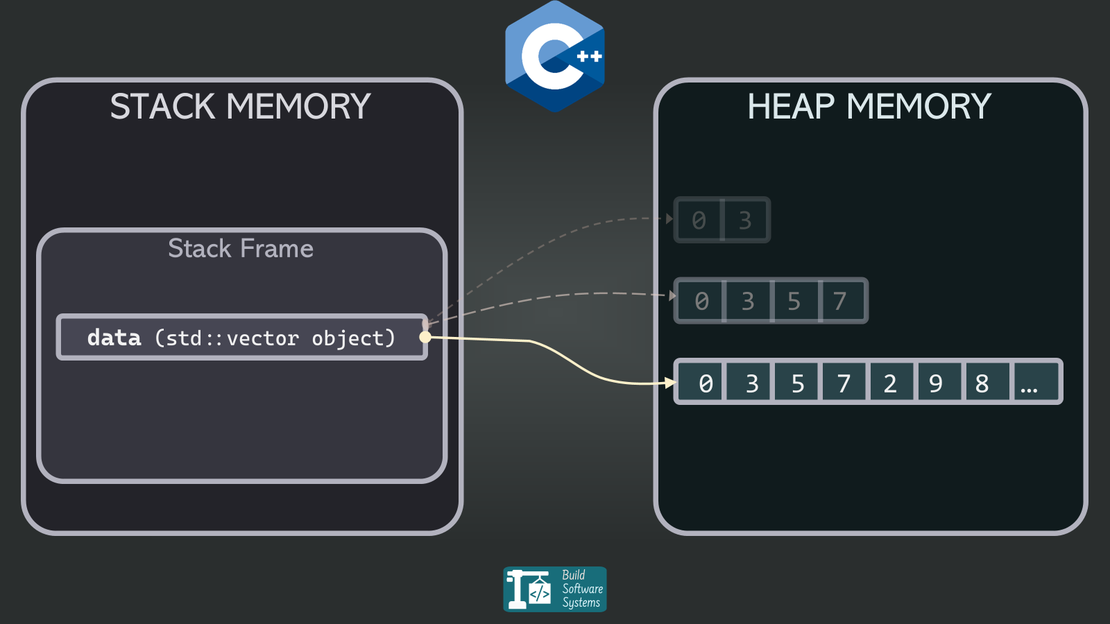
STL containers like std::vector manage their internal storage dynamically. When the internal buffer runs out of space, it:
- Allocates a larger buffer on the heap
- Copies all existing data
- Frees the old buffer
For large n, this process repeats many times — and each copy is costly.
How std::vector Grows (and Why That Hurts)
By default, std::vector grows exponentially, typically by a factor of 1.5× to 2×.
For n = 1,000,000, the growth might look like this:
0 → 1 → 2 → 4 → 8 → 16 → ... → ~1,048,576
This results in ~20 reallocations, each copying all previous elements. That’s millions of wasted memory moves — totally avoidable.
std::vector Performance: push_back() vs reserve()
Let’s compare two ways of filling a vector:
Naive push_back() (no reserve())
1std::vector<int> data;
2for (int i = 0; i < n; ++i)
3    data.push_back(i + i + 1);
- Triggers ~20 reallocations for
n = 1M - Copies previous elements repeatedly
- Worst performance
reserve() + push_back()
1std::vector<int> data;
2data.reserve(n);  // One heap allocation
3for (int i = 0; i < n; ++i)
4    data.push_back(i + i + 1);
- Allocates heap memory once
- No reallocations or copies
- Much faster
Benchmark: 1 Million Elements
I benchmarked both methods with n = 1,000,000, repeated 100 times. Full code is in the Annex.
Naive push_back():         1.84 seconds
Reserve + push_back():     0.45 seconds
Result: 4× faster just by calling reserve().
What’s Happening Under the Hood?
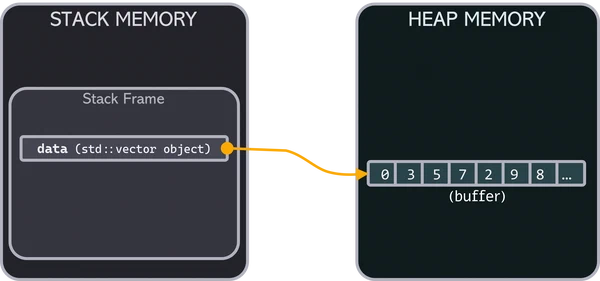
std::vector memory representationEven when declared on the stack:
1std::vector<int> data;
…the actual buffer lives on the heap — the region of memory used for dynamic allocation during runtime, managed via new, malloc(), or STL internals.
Each time the vector grows, it performs:
- New heap allocation
- Element-wise copy of old data
- Old buffer deallocation
This is where most of the performance cost lies — not in push_back() itself, but in avoiding or triggering these heap operations.
Why reserve() Matters
Calling reserve(n):
- Allocates enough space once
- Prevents future reallocations
- Keeps memory contiguous and cache-friendly
- Eliminates element copying during growth
Preallocation doesn’t just reduce time — it makes your code more predictable by eliminating hidden reallocations that can:
- Break references and pointers: each reallocation moves the buffer, invalidating existing addresses.
- Cause subtle bugs: iterator invalidation can silently corrupt loops or algorithms if not handled.
- Spike latency unexpectedly: reallocations happen mid-loop, introducing pauses that hurt real-time systems.
Which STL Containers Benefit from reserve()?
std::vector isn’t the only STL container that can benefit from preallocation:
| Container | Supports reserve() | Benefit |
|---|---|---|
std::vector | Yes | Avoids reallocations |
std::string | Yes | Avoids heap copying |
std::unordered_map | Yes (bucket reserve) | Avoids rehashing |
std::unordered_set | Yes (bucket reserve) | Avoids rehashing |
std::deque | No | Uses segmented buffers |
If a container supports reserve(), use it when you know the target size — it’s one of the easiest wins in performance tuning.
Newsletter
Subscribe to our newsletter and stay updated.
Final Takeaways
- STL containers store their data on the heap, even if the object is on the stack.
- Growing a vector without
reserve()causes multiple reallocations and copies. - A simple
reserve(n)avoids all that — and can result in 4x speedup. - Use
reserve()anytime you know the target size ahead of time.
Tip
In high-performance C++, memory allocation isn’t just a detail — it’s the difference between fast and slow. Master the heap. Preallocate with intent.
Annex
Benchmark code:
 1// benchmark.cpp
 2#include <iostream>
 3#include <vector>
 4#include <chrono>
 5
 6constexpr int REPEAT = 100;
 7constexpr int ELEMENTS = 1'000'000;
 8
 9int main() {
10    using namespace std::chrono;
11
12    duration<double> total_reserved_append(0);
13    duration<double> total_append(0);
14
15    for (int r = 0; r < REPEAT; ++r) {
16        // Case 1: Naive push_back()
17        auto start = high_resolution_clock::now();
18        std::vector<int> naive_vector;
19        for (int i = 0; i < ELEMENTS; ++i)
20            naive_vector.push_back(i + i + 1);
21        total_append += high_resolution_clock::now() - start;
22
23        // Case 2: reserve + push_back()
24        start = high_resolution_clock::now();
25        std::vector<int> reserved_vector;
26        reserved_vector.reserve(ELEMENTS);
27        for (int i = 0; i < ELEMENTS; ++i)
28            reserved_vector.push_back(i + i + 1);
29        total_reserved_append += high_resolution_clock::now() - start;
30    }
31
32    std::cout << "\n# EXECUTION TIME (C++)\n";
33    std::cout << "Naive push_back():         " << total_append.count() << " seconds\n";
34    std::cout << "Reserve + push_back():     " << total_reserved_append.count() << " seconds\n";
35
36    return 0;
37}
Compile & Run:
1g++ -O2 -o benchmark benchmark.cpp
2./benchmark
Are you learning C++? Check out this curated list of resources and coding conventions here.