Tired of Debating Code Style? Automate Your Way to Consistency
- October 6, 2025
- 4 min read
- Programming concepts
Every developer has been there. You’re reviewing a pull request (PR), ready to dive into the logic, but all you see are a million formatting changes.
A line that’s a few characters too long, imports that are a jumbled mess, or a block of variable declarations that just won’t line up.
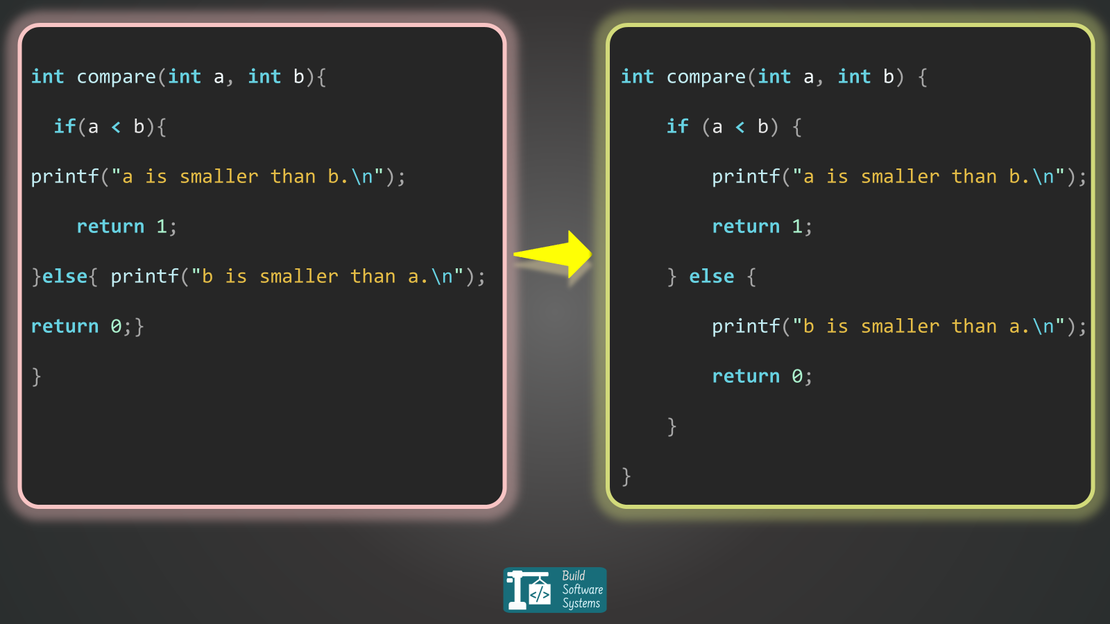
Here’s what that looks like in a language like Go:
Ugly, inconsistent code:
 1 package main
 2
 3import "time"
 4import "fmt"
 5
 6func aVeryLongFunction(paramOne string, paramTwo int, paramThree bool, paramFour float64) {
 7    longList := []string{fmt.Sprintf("paramOne is %s", paramOne), fmt.Sprintf("paramTwo is %d", paramTwo), fmt.Sprintf("paramThree is %t", paramThree), fmt.Sprintf("paramFour is %f", paramFour)};
 8    anotherVariable := 1
 9    short := 2
10  doSomethingWith(long_list, anotherVariable, short, time.Now())
11}
Clean, beautiful, formatted code:
 1package main
 2
 3import (
 4  "fmt"
 5  "time"
 6)
 7
 8func aVeryLongFunction(
 9  paramOne string,
10  paramTwo int,
11  paramThree bool,
12  paramFour float64,
13) {
14  longList := []string{
15    fmt.Sprintf("paramOne is %s", paramOne),
16    fmt.Sprintf("paramTwo is %d", paramTwo),
17    fmt.Sprintf("paramThree is %t", paramThree),
18    fmt.Sprintf("paramFour is %f", paramFour)
19  };
20  anotherVariable    := 1
21  short              := 2
22  doSomethingWith(long_list, anotherVariable, short, time.Now())
23}
This isn’t just about aesthetics; it’s about the cognitive load you place on yourself and your team.
The Problem with Inconsistency
When code styles vary, it creates unnecessary friction. Code reviews turn into debates over semicolons and indentation.
Merging branches becomes more complicated because diffs are filled with noise instead of meaningful changes.
Onboarding new team members becomes a lesson in unwritten style rules rather than business logic.
The Power of Automation
The solution is to stop doing it by hand. Automated code formatters are available for almost every modern programming language.
They are designed to enforce a consistent style by parsing your code and re-printing it according to a strict set of rules.
This leads to a number of immediate benefits:
- Clean, Meaningful PRs: Code reviews can focus on logic and architecture, not on style.
- Reduced Friction: Debates over tabs vs. spaces or brace placement are eliminated entirely.
- Faster Onboarding: New developers can contribute immediately without having to learn a complex style guide.
- A Single Source of Truth: Your codebase becomes a consistent, unified whole, regardless of who is writing the code.
The Right Tool for the Job
Most languages have a single, community-accepted tool for this purpose. You can run them manually or configure your editor to run on save.
| Language | Popular Tool | Command |
|---|---|---|
| Python | Black | black . |
| JavaScript/TS | Prettier | prettier --write . |
| Go | gofmt (built-in) OR golines | gofmt -w . OR golines . |
| Rust | rustfmt | cargo fmt OR rustfmt main.rs |
| C# | dotnet format | dotnet format |
| C/C++ | ClangFormat | clang-format -i main.cpp |
| Java | Google Java Format | google-java-format -i *.java |
| PHP | PHP-CS-Fixer | php-cs-fixer fix |
| Ruby | RuboCop | rubocop -a |
| Kotlin | ktlint | ktlint -F |
Tip
For GitHub Users:
If your project uses multiple languages, or you simply want an all-in-one solution, consider using the Super-Linter GitHub Action.
It automatically runs a comprehensive suite of linters and formatters on your code, making it incredibly easy to enforce consistent style with minimal setup.
Integrate it into your CI/CD
The final step for ensuring consistency is to integrate these tools into your CI/CD pipeline.
Add a simple check or an auto-formatting step. You can add these to your pre-commit hooks or pull request workflows. This guarantees every piece of code is perfectly formatted.
You don’t need to write a complex CI script from scratch. Most DevOps platforms have extensive documentation. They also offer community-provided templates to get you started.
Here are a few key resources for integrating code formatting:
- GitHub Actions: Implementing a GitHub Actions workflow for code formatting
- GitLab CI/CD: Using Code Quality reports in GitLab CI/CD
- Bitbucket Pipelines: Example of a Bitbucket Pipeline with dotnet format
- Azure DevOps: Using the “Format Check” extension for Azure Pipelines
Stop wasting time on formatting debates. Automate the boring parts of your workflow and focus on writing great code.
Newsletter
Subscribe to our newsletter and stay updated.